sitemapThe Radiant Data Pipeline

A comprehensive overview of how security data flows through Radiant.

The Radiant Data Pipeline is the engine behind Radiant's AI SOC Analyst, purpose-built to ensure 100% of security alerts are investigated, enriched, and triaged automatically. Every piece of security data ingested flows through a structured series of stages designed to eliminate noise and deliver only actionable signals to the security team.

Pipeline architecture

Radiant ingests 100% of security data from across the environment: alerts, events, and contextual information from every connected source. Every piece of this data remains fully accessible throughout the pipeline, giving the AI SOC Analyst the complete context needed to triage alerts with the same depth and rigor as a seasoned human analyst.

Data Flow Stages

The Radiant pipeline follows a structured flow through eight key stages:

1

Data ingestion

Collection of security data via multiple integration methods, feeding it into the pipeline for AI triage.

2

Data processing

Minimal parsing to append Radiant-specific fields; syslog undergoes enhanced processing to optimize log structure for AI query and ensure the data is consistently structured for AI triage.

3

Data indexing and storage

Organization into purpose-built indexes for fast search, compliance, and AI triage availability.

4

Alert filtering

Definition of custom criteria (e.g., source/destination IP, hostname, username) to automatically exclude known benign or low-fidelity alerts from triage.

5

Alert deduplication

Contextual correlation to identify duplicate alerts and reduce noise.

6

Alert triage pipeline

Radiant's AI SOC Analyst automated triage of every incoming alert, combining raw alert data, artifact enrichment, threat intelligence, dynamic plan execution and Human-in-the-loop tuning into a contextualized, reviewable verdict.

7

Case management

Case creation to track, assign, and manage complex investigations that require deeper analysis beyond automated triage.

8

Threat containment and response

Active threats containment and remediation directly from a case with response actions.

Data ingestion

Radiant Security ingests security telemetry and contextual data through a unified integration framework called Data Connectors, supporting multiple ingestion methods to accommodate diverse security infrastructure - from cloud-native APIs to on-premises syslog forwarders.

Security telemetry

Alerts, event logs, and raw security data are ingested from your connected security tools and infrastructure. Each data connector method is optimized for specific use cases and data sources:

chevron-rightPersist APIshashtag
Type
Description
Storage Behavior

Pull

Direct integrations that pull data from vendor API endpoints on an ongoing basis to retrieve logs, alerts, or contextual information

Stored in Radiant-managed storage or customer S3 (BYOBarrow-up-right)

chevron-rightQuery APIshashtag
Type
Description
Storage Behavior

Pull

API integrations that query for relevant data at the time of triage, retrieving information on-demand

Not stored in Log Management; queried in real-time

chevron-rightSysloghashtag
Type
Description
Storage Behavior

Push

Standard protocol (UDP/TCP) used by systems and network devices to stream real-time log messages to Radiant

Stored in Radiant-managed storage or customer S3 (BYOBarrow-up-right)

chevron-rightWebhookshashtag
Type
Description
Storage Behavior

Push

Vendor-initiated HTTP callbacks that push events to Radiant instantly whenever new activity occurs

Stored in Radiant-managed storage or customer S3 (BYOBarrow-up-right)

chevron-rightGeneric S3 Buckethashtag
Type
Description
Storage Behavior

Push/Pull

S3-compatible cloud storage location where customers deposit raw log files that Radiant periodically retrieves and ingests

Stored in Radiant-managed storage or customer S3 (BYOBarrow-up-right)

chevron-rightRadiant Security Agenthashtag
Type
Description
Storage Behavior

Push

Lightweight software agent installed in customer environments to collect and forward raw logs from on-premises systems securely

Stored in Radiant-managed storage or customer S3 (BYOBarrow-up-right)

Contextual data

Contextual data is ingested alongside security telemetry from the start of the pipeline, ensuring it is available when alerts reach the triage stage. Radiant draws from three categories of contextual data:

  1. Out-of-the-box threat intelligence services - external services queried during triage to determine whether an extracted artifact is known malicious or confirmed good, including file hashes, URLs, domains, and IPs. Sources include Malware Bazaar, Google WebRisk, FireHOL, Cisco Umbrella, and NSRL, among others.

  2. Context lists - curated lists of artifacts classified as malicious or benign, maintained by Radiant's research team and retrieved during triage. Customers can also maintain their own lists via Settings → Mapping → Allow/Denyarrow-up-right to reflect environment-specific trusted or blocked artifacts.

  3. Alert history - past threat associations surfaced during triage, giving AI agents historical context about artifacts previously seen across your environment.

circle-info

Note: For details on how contextual data is used during alert triage, see Alert triage pipeline > Alert enrichment.

Data processing

Raw log preservation philosophy

Unlike traditional SIEM architectures that transform ingested data into a normalized Common Information Model (CIM) or Elastic Common Schema (ECS), Radiant takes a fundamentally different approach to log processing. The Radiant pipeline retains logs in their original, vendor-defined raw format. This approach maintains data fidelity and prevents information loss that can occur when aggressive schema transformations are applied.

Rather than forcing logs into a predefined structure, Radiant appends only a minimal set of metadata fields required for internal pipeline operations and standardization. Some fields are appended to every event, while others vary based on the connector type and event category:

chevron-rightCore fields (present in all events)hashtag
Field name
Description

rs_timestamp

Standardized timestamp extracted from the original log.

rs_received

Timestamp when Radiant received the log.

rs_indexed

Timestamp when the log was indexed in Radiant.

rs_connectorType

Identifies the source connector that ingested the data (e.g., microsoft_windows_security).

chevron-rightRadiant Agent specific fieldshashtag
Field name
Description

rs_sc_host

Radiant Agent host identifier.

rs_sc_tag

Radiant Agent tag for log categorization (e.g., winlog.security_events).

rs_src_host

Radiant Agent source hostname where the event originated.

rs_src_ip

Source IP address where the event originated.

chevron-rightAlert-specific fieldshashtag
Field name
Description

rs_alertID

Unique identifier for the alert.

rs_parentAlertID

Reference to the originally triaged alert when deduplication occurs.

rs_filterRule

Identifier for alerts that were suppressed.

All ingested data remains queryable in its native format through Log Management, which is built on Quickwit's search APIarrow-up-right, allowing analysts to access vendor-specific fields, nested JSON structures, and proprietary log formats without schema constraints.

Data indexing and storage

Radiant Log Management stores all ingested security data directly from your existing infrastructure, offering flexible retention and eliminating vendor lock-in. For detailed guidance on storage configuration and retention policies, see Storage and Retention.

All ingested data is organized into four purpose-built indexes based on processing status and data type:

Index
Contents
Purpose

Parsed events

All alerts and events successfully processed with Radiant metadata fields appended (e.g., rs_timestamp, rs_connectorType)

Primary queryable log repository; includes filtered alerts for compliance

Unparsed events

All alerts and events that generated parsing errors and could not be successfully processed.

Error handling, troubleshooting, and connector configuration issues

Alerts

All initial and duplicate alerts (excluding filtered alerts) that passed filtering and are eligible for triage

Active alert investigation and triage workflows

Detailed record of user actions within the Radiant application

Compliance tracking, change management, and internal security monitoring

Access indexes in Log Management

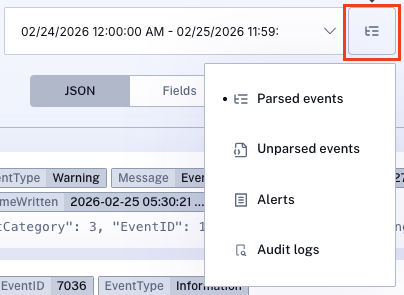
All indexes are accessible and fully searchable directly within the Log Management interface, regardless of your storage configuration. To switch between indexes, navigate to Log Management and click the square Index Selector button to the left of the Run button. A drop-down menu will display the four available indexes: Parsed Events, Unparsed Events, Alerts, and Audit Logs - allowing customers to scope their search to the relevant dataset.

Query on demand

For detailed guidance on crafting search queries, see Craft Search Queries in Log Managementarrow-up-right.

Alert filtering

Third-party security vendors generate a high volume of alerts, many of which are low-fidelity or redundant. Without filtering, this noise pollutes the alert queue and overwhelms security teams, even with AI triage in place. Alert filtering ensures that analysts focus on critical threats by suppressing known non-actionable alerts before they reach the triage pipeline, reducing both noise and the storage and compute costs associated with processing low-fidelity data.

Radiant applies two types of filter rules sequentially during ingestion:

  • Default Rules - Out-of-the-box rules created and maintained by Radiant, targeting known false positive patterns and low fidelity signals.

  • Custom Rules - Customer-defined rules that further narrow the suppression scope of a default rule to address environment-specific noise.

Filtered alerts are never deleted - they remain available in Log Management for compliance, forensic investigation, and historical analysis.

For detailed guidance on configuring and managing alert filter rules, see Alert Filters.

Alert deduplication

Security vendors, particularly network (IDS/IPS) and DLP tools, frequently generate large volumes of near-identical alerts for the same underlying event or repeated occurrences within a short time window. Without deduplication, these redundant alerts clutter the alert queue, waste analyst time, and create performance bottlenecks in the triage pipeline. Radiant addresses this by applying a deduplication step after alert filtering and before AI triage, collapsing duplicate alerts from the same data feed into a single primary alert without losing the fidelity of the original data.

How deduplication works

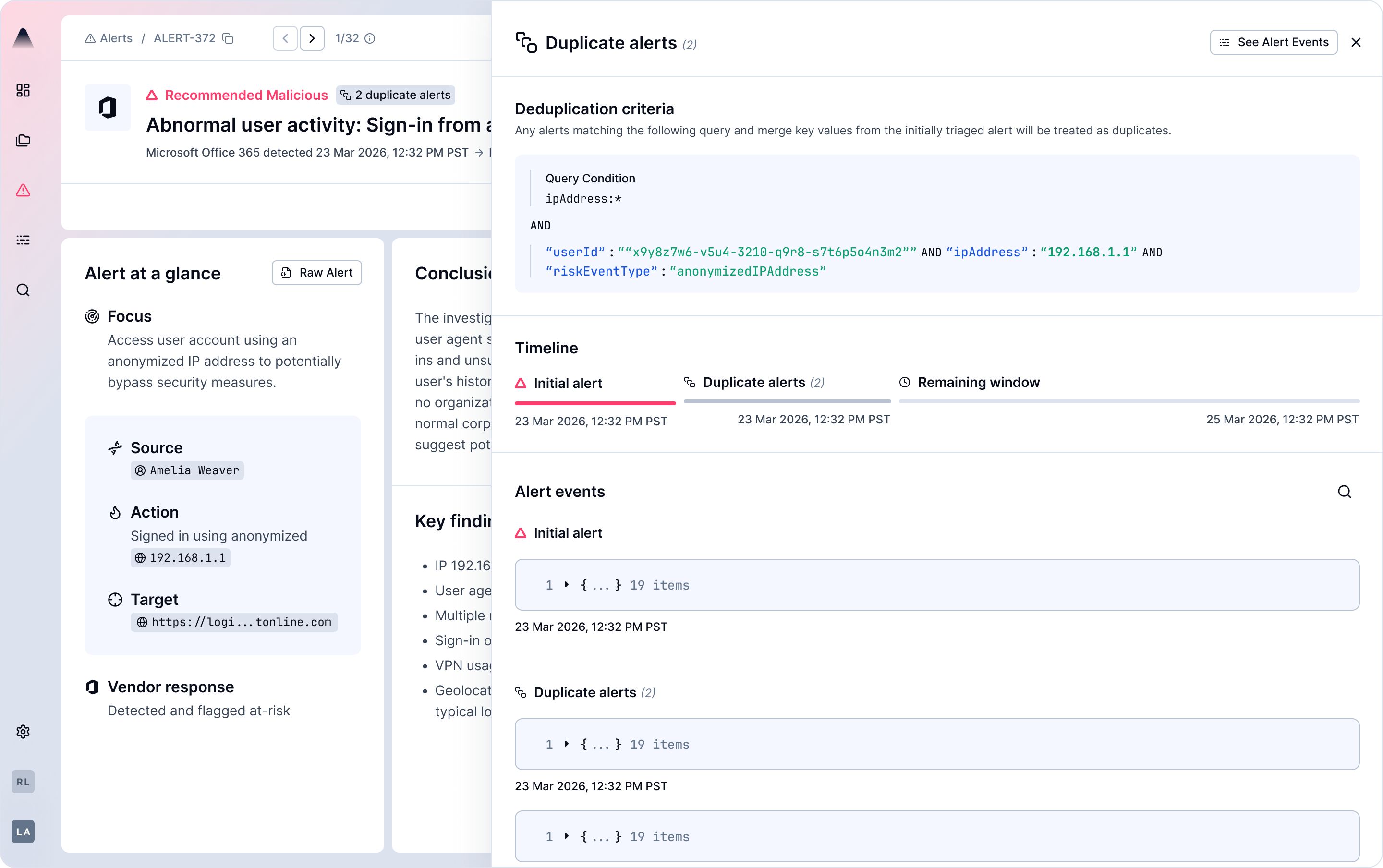
When a new alert arrives from a connector, it goes through the normal triage process and becomes the Initial alert. Any subsequent alerts from the same source that match the same criteria are recognized as duplicates and consolidated under that initial alert rather than creating separate entries. This grouping window stays active for 3 days—any additional matching alerts that arrive during that period continue to be consolidated under that same initial alert. Both the deduplication logic and time window can be customized with the help of the Radiant Success team.

For more information about deduplication, see Alert Deduplication.

For more details on reviewing and managing deduplicated alerts, see The Duplicate Alerts Panelarrow-up-right.

Alert triage pipeline

Every alert that arrives at this stage enters Radiant's AI-powered triage pipeline, where a series of specialized agents automate the process of classifying and investigating security alerts, assigning each a verdict of Recommended Benign, Likely Benign, or Recommended Malicious. The pipeline operates through five stages, in this order: Classification, Enrichment, Planning, Execution, and Verdict and Human-in-the-Loop. Understanding how these stages work together helps you understand how Radiant approaches each alert in your environment.

Triage pipeline stages

1

Alert classification

Alert classification is the first stage of the triage pipeline. When an alert arrives, Radiant analyzes its raw data to build a structured understanding of what the alert is about and whether similar alerts have been seen in your environment before.

This interpretation captures the essential characteristics of the alert, such as:

  • What was detected and why it is suspicious

  • The specific processes, files, commands, or behaviors involved

  • The environment and systems where the detection occurred

This structured classification serves two purposes: it gives Radiant a meaningful, human-readable summary of the alert, and it provides the foundation for determining whether a new triage plan needs to be created or whether a previously successful plan can be reused.

2

Alert enrichment

Once the alert is classified, Radiant extracts all entities, indicators of compromise (IOCs), and relevant artifacts from the raw alert fields. These are enriched in a single consolidated step using all available data sources, including connected security tools, internal and external threat intelligence feeds, IAM data, and asset inventories, so that all subsequent pipeline steps can leverage these findings.

3

Plan generation

If an alert is the first of its kind in your environment, Radiant generates a net-new triage plan tailored to that alert.

A Plan is a structured, reusable set of tasks and questions designed to guide the investigation of an alert toward a classification of benign or malicious. Plans are built dynamically based on Radiant's expert knowledge, knowledge of your environment and your active integrations - meaning Radiant is not limited to a fixed library of questions or predefined alert types its able to triage.

Plans are composed of two building blocks:

Tasks

A task is a discrete triage objective that must be completed to support the classification of an alert. Each task represents a focused area of investigation, such as verifying the legitimacy of a process, assessing whether a behavior matches known attack patterns, or determining whether a user's activity is expected given their role.

Questions

A question is a specific, answerable inquiry that operationalizes its parent task by defining exactly what information needs to be gathered and how. Questions translate task goals into concrete data retrieval queries that can be executed against your security tools, data sources, or threat intelligence platforms.

Together, tasks define what needs to be investigated and why, while questions define what information must be obtained and how to get it.

Plan reuse

Radiant avoids redundant work by reusing triage plans across alerts that share the same nature and context. Rather than generating a new plan for every incoming alert, Radiant evaluates whether a plan already exists that is applicable to the new alert.

When a new alert arrives, Radiant compares it against previously triaged alerts in your environment. If the new alert is sufficiently similar to one Radiant has seen before, the existing plan is reused. If no comparable alert exists, Radiant generates a new plan from scratch.

4

Plan execution

Once a plan has been generated or retrieved through reuse, Radiant executes it by working through the plan's tasks, and questions. For each question, Radiant queries the required data sources, tools, or threat intelligence platforms to retrieve the information needed. As questions are answered, their parent tasks are progressively completed, and the accumulated findings across all tasks drive Radiant toward a final verdict.

5

Verdict and human-in-the-loop tuning

Once all tasks are complete, a final reasoning layer reviews the previous outputs, including the original alert, the research document, and all task results, It then delivers a verdict of recommended benign, likely benign, or recommended malicious, along with a summary of the conclusion and key findings.

The report explains the AI’s reasoning in a transparent way and gives analysts the context they need to understand and validate the recommendation.

Analysts can accept or reject the verdict. Once reviewed, alerts can be grouped into cases to create a unified view of a threat and support further action from a single place.

Verdict
Description

Recommended Malicious

The AI found sufficient evidence to suggest the alert represents a genuine threat

Recommended Benign

The AI found sufficient evidence to conclude the alert is not a genuine threat

Likely Benign (Inconclusive)

The AI could not reach a confident conclusion with the available data

Malicious

Confirmed malicious verdict (email use case)

Benign

Confirmed benign verdict (email use case)

Case management

Once an alert has been triaged by Radiant's AI pipeline, analysts can manually escalate it into a Case for deeper investigation and response. Cases provide a centralized workspace for tracking complex threats, grouping related alerts, assigning ownership, and executing response actions - bridging the gap between automated triage and human-led investigation.

From a pipeline perspective, Cases represent the final stage of the data flow: raw security data that was ingested, filtered, deduplicated, and triaged has now surfaced a signal that warrants structured investigation. A Case can contain alerts of any verdict, including benign alerts that, when grouped with other signals, reveal a broader threat pattern.

Cases are created manually by SOC analysts. The AI pipeline recommends but does not automatically escalate alerts into Cases, ensuring analysts retain full control over which threats receive formal investigation and response.

For a complete guide on creating and managing Cases, including escalation workflows, artifact consolidation, and investigation lifecycle management, see Radiant Cases.

Threat containment and response

When a case is escalated, Radiant enables analysts to take direct remediation action on the key artifacts associated with an attack - such as blocking URLs, disabling compromised user accounts, or isolating affected endpoints - without leaving the platform.

For guidance on how to execute, verify, and reverse response actions, see Response Actions in Casesarrow-up-right.

For a complete list of available response actions, see Radiant Response Actionsarrow-up-right.

Last updated

Was this helpful?